Skip to content

Tutorial 1: Color Visualization

Tutorial: Single Image

Feature extraction

Click to expand full code
def feature_extractor(images, resolution=(448, 448), layer=11):
    ...
    return feat  # (B, H, W, D)
from einops import rearrange
import torch
from PIL import Image
import torchvision.transforms as transforms
from torch import nn


def feature_extractor(images, resolution=(448, 448), layer=11):

    if not isinstance(images, list):
        images = [images]

    transform = transforms.Compose(
        [
            transforms.Resize(resolution),
            transforms.ToTensor(),
            transforms.Normalize([0.485, 0.456, 0.406], [0.229, 0.224, 0.225]),
        ]
    )

    # extract DINOv2 last layer features from the image
    class DiNOv2Feature(torch.nn.Module):
        def __init__(self, ver="dinov2_vitb14_reg", layer=11):
            super().__init__()
            self.dinov2 = torch.hub.load("facebookresearch/dinov2", ver)
            self.dinov2.requires_grad_(False)
            self.dinov2.eval()
            self.dinov2 = self.dinov2.cuda()
            self.layer = layer

        def forward(self, x):
            out = self.dinov2.get_intermediate_layers(x, reshape=True, n=np.arange(12))[self.layer]
            return out

    feat_extractor = DiNOv2Feature(layer=layer)

    feats = []
    for i, image in enumerate(images):
        torch_image = transform(image)
        feat = feat_extractor(torch_image.unsqueeze(0).cuda()).cpu()
        feat = feat.squeeze(0).permute(1, 2, 0)
        feats.append(feat)
    feats = torch.stack(feats)
    return feats  # (B, H, W, D) 
1
2
3
4
5
6
import requests
from PIL import Image

url = "https://huzeyann.github.io/assets/img/prof_pic_old.jpg"
image = Image.open(requests.get(url, stream=True).raw)
image
prof_pic_old.jpg
1
2
3
4
feat = feature_extractor(image, resolution=(448, 448), layer=9)
feat = feat.squeeze(0)
print(feat.shape)
# (32, 32, 768)

Compute Ncut

1
2
3
4
5
6
7
from ncut_pytorch import Ncut

h, w, c = feat.shape  # (32, 32, 768)
ncut = Ncut(n_eig=20)
eigenvectors = ncut.fit_transform(feat.flatten(0, 1))
print("Eigenvectors shape:", eigenvectors.shape)
# Eigenvectors shape: torch.Size([1024, 20])

Plotting: Basic

Click to expand full code
import matplotlib.pyplot as plt

fig, axs = plt.subplots(3, 4, figsize=(13, 10))
...
plt.show()
# visualize top 9 eigenvectors, 3 eigenvectors per row
import matplotlib.pyplot as plt
from ncut_pytorch.utils.math import quantile_normalize
fig, axs = plt.subplots(3, 4, figsize=(13, 10))
i_eig = 0
for i_row in range(3):
    for i_col in range(1, 4):
        ax = axs[i_row, i_col]
        ax.imshow(eigenvectors[:, i_eig].reshape(h, w), cmap="coolwarm", vmin=-0.1, vmax=0.1)
        ax.set_title(f"lambda_{i_eig} = {ncut.eigval[i_eig].item():.3f}")
        ax.axis("off")
        i_eig += 1
for i_row in range(3):
    ax = axs[i_row, 0]
    start, end = i_row * 3, (i_row + 1) * 3
    rgb = quantile_normalize(eigenvectors[:, start:end]).reshape(h, w, 3)
    ax.imshow(rgb)
    ax.set_title(f"eigenvectors {start}-{end-1}")
    ax.axis("off")
plt.suptitle("Top 9 eigenvectors of Ncut DiNOv2 last layer features")
plt.tight_layout()
plt.show()
image_eig_single.png

Plotting: Advanced

Click to expand full code
def plot_3d(X_3d, rgb, title):
    ...
import matplotlib.pyplot as plt
from mpl_toolkits.mplot3d import Axes3D

def plot_3d(X_3d, rgb, title):
    x, y, z = X_3d.T
    fig = plt.figure(figsize=(10, 5))

    # Add a subplot for the static image
    ax1 = fig.add_subplot(121)
    ax1.imshow(rgb.reshape(h, w, 3))
    ax1.axis('off')  # Hide axes

    # Add a subplot for the 3D scatter plot
    ax = fig.add_subplot(122, projection='3d')
    scat = ax.scatter(x, y, z, c=rgb, s=10)

    # set ticks labels
    ax.set_xlabel("Dimension #1")
    ax.set_ylabel("Dimension #2")
    ax.set_zlabel("Dimension #3")

    # set ticks, labels to none
    x_ticks = ax.get_xticks()
    y_ticks = ax.get_yticks()
    z_ticks = ax.get_zticks()
    labels = ["" for _ in range(len(x_ticks))]
    ax.set_xticklabels(labels)
    ax.set_yticklabels(labels)
    ax.set_zticklabels(labels)

    plt.suptitle(title)
    plt.show()
1
2
3
4
from ncut_pytorch.color import umap_color

rgb = umap_color(eigenvectors[:, :10])
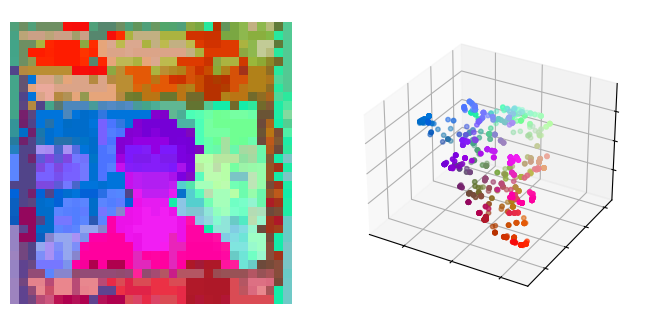
plot_3d(rgb, rgb, "UMAP colors from the top 10 eigenvectors")
tsne_single.png

Tutorial: Multiple Images

Feature extraction

Click to expand full code
dataset = torchvision.datasets.VOCSegmentation(...)
feat = feature_extractor(images, layer=9)
# Feature shape for 100 images: torch.Size([100, 32, 32, 768])
import torchvision
import torch
from torchvision import transforms
from PIL import Image
import numpy as np

dataset_voc = torchvision.datasets.VOCSegmentation(
    "/data/pascal_voc/",
    year="2012",
    download=True,
    image_set="val",
)
print("number of images in the dataset:", len(dataset_voc))

image = dataset_voc[0][0]
feat = feature_extractor(image, resolution=(448, 448), layer=9)
print("Feature shape per-image:", feat.shape)
num_nodes = feat.shape[0] * feat.shape[1]
print("Number of nodes per-image:", num_nodes)

# create a large-scale feature matrix
images = [dataset_voc[i][0] for i in range(100)]
feats = feature_extractor(images, resolution=(448, 448), layer=9)
print("Feature shape for 100 images:", feats.shape)
num_nodes = np.prod(feats.shape[:3])
print("Number of nodes for 100 images:", num_nodes)

# Feature shape for 100 images: torch.Size([100, 32, 32, 768])
# Number of nodes for 100 images: 102400

Compute Ncut

1
2
3
4
from ncut_pytorch import Ncut

input_feats = feats.flatten(0, 2)
eigenvectors = Ncut(n_eig=50).fit_transform(input_feats)

Plotting

Click to expand full code
def plot_images(images, rgb, title):
    ...
import matplotlib.pyplot as plt

def plot_images(images, rgb, title):
    fig, axs = plt.subplots(6, 8, figsize=(15, 10))
    for i_row in range(0, 6, 2):
        for i_col in range(8):
            ax = axs[i_row, i_col]
            image = images[i_row * 8 + i_col]
            image = image.resize((224, 224), Image.BILINEAR)
            ax.imshow(image)
            ax.axis("off")
        for i_col in range(8):
            ax = axs[i_row + 1, i_col]
            ax.imshow(rgb[i_row * 8 + i_col])
            ax.axis("off")
    plt.suptitle(title)
    plt.show()    
1
2
3
4
5
from ncut_pytorch.color import umap_color

rgb = umap_color(eigenvectors[:, :50])
image_rgb = rgb.reshape(feats.shape[:3] + (3,))
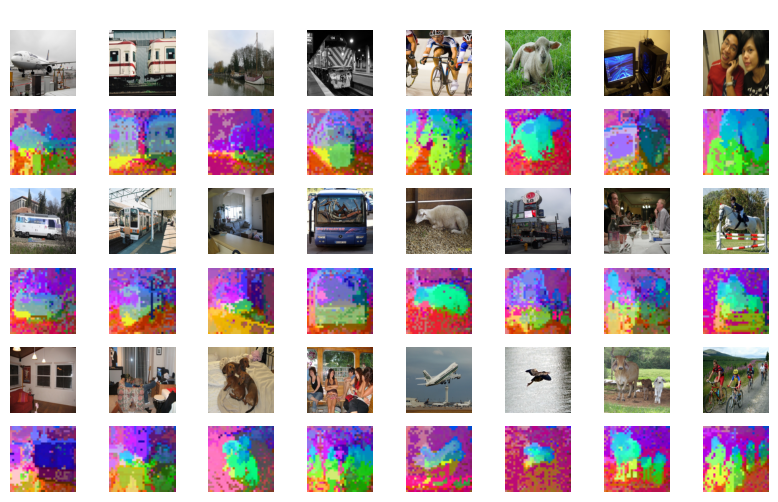
plot_images(images, image_rgb, "Ncut top 50 eigenvectors, DiNOv2 layer9")
multiple_images_tsne.png

Tutorial: Video

Feature extraction

Click to expand full code
def video_mae_feature(video_path, layer=11):
    ...
    return feature  # (t/2, (h*w), c)
class VideoMAE(nn.Module):
    def __init__(self, layer=11, **kwargs):
        super().__init__()

        try:
            from transformers import VideoMAEForVideoClassification
        except ImportError:
            raise ImportError(
                "Please install the transformers library: pip install transformers"
            )

        self.model = VideoMAEForVideoClassification.from_pretrained(
            "MCG-NJU/videomae-base-finetuned-kinetics"
        )
        self.model.requires_grad_(False)
        self.model.eval()

        self.layer = layer

    def forward(self, x):
        assert x.dim() == 5
        assert x.shape[1:] == (16, 3, 224, 224)  # frame, color channel, height, width

        outputs = self.model(x, output_hidden_states=True, return_dict=True)
        layer_idx = - (12 - self.layer)
        return outputs.hidden_states[layer_idx] 
        # last_layer = outputs.hidden_states[-1]
        # return last_layer


from PIL import Image
from torchvision.transforms import Compose, Resize, CenterCrop, ToTensor, Normalize
import numpy as np


def transform_images(frames, size=(224, 224)):
    resized = []
    length = len(frames)
    for i in range(length):
        frame = frames[i]
        # image = Image.fromarray((frame * 255).astype(np.uint8))
        image = Image.fromarray(frame)
        image = image.resize(size, Image.ANTIALIAS)
        image = np.array(image) / 255.0
        resized.append(np.array(image))
    frames = np.stack(resized, axis=0)
    frames = frames.transpose(0, 3, 1, 2)  # (N, H, W, C) -> (N, C, H, W)
    frames = torch.tensor(frames, dtype=torch.float32)
    mean = torch.tensor([0.485, 0.456, 0.406]).view(1, 3, 1, 1)
    std = torch.tensor([0.229, 0.224, 0.225]).view(1, 3, 1, 1)
    frames = (frames - mean) / std
    return frames


def read_video(video_path: str) -> torch.Tensor:
    try:
        from decord import VideoReader
    except ImportError:
        raise ImportError("Please install the decord library: pip install decord")

    vr = VideoReader(video_path)
    print(f"Total frames: {len(vr)}")
    # frames = vr.get_batch(range(len(vr))).asnumpy()
    lenth = len(vr)
    lenth = 1600 if lenth > 1600 else lenth
    frames = vr.get_batch(np.arange(lenth)).asnumpy()
    # if less than 1600 frames, repeat the last frame
    if lenth < 1600:
        last_frame = frames[-1]
        for i in range(1600 - lenth):
            frames = np.append(frames, last_frame.reshape(1, *last_frame.shape), axis=0)
    # frames = np.array(frames)
    frames = transform_images(frames)
    return frames


def video_mae_feature(video_path, layer=11):
    frames = read_video(video_path)
    videomae = VideoMAE(layer=layer)
    videomae = videomae.cuda()
    frames = frames.cuda()
    frames = rearrange(frames, "(b t) c h w -> b t c h w", t=16)
    feats = videomae(frames)
    return feats  # (t/2, (h*w), c)

1
2
3
4
video_path = './tmp/video.mp4'
features = video_mae_feature(video_path, layer=11)
print("Features shape:", features.shape)
# Features shape: torch.Size([100, 1568, 768])

Compute Ncut

1
2
3
4
5
6
from ncut_pytorch import Ncut

ncut = Ncut(n_eig=20)
eigenvectors = ncut.fit_transform(features.flatten(0, 1))
print("Eigenvectors shape:", eigenvectors.shape)
# Eigenvectors shape: torch.Size([156800, 20])

Plotting

1
2
3
from ncut_pytorch.color import umap_color

rgb = umap_color(eigenvectors)
Click to expland full code
def get_one_plot(i_frame, vr=vr, rgb=rgb):
    ...
    plt.show()
import matplotlib.pyplot as plt
from decord import VideoReader

vr = VideoReader(video_path)

import matplotlib.gridspec as gridspec
def get_one_plot(i_frame, vr=vr, rgb=rgb):
    fig = plt.figure(figsize=(10, 5))
    gs = gridspec.GridSpec(1, 2, width_ratios=[1.8, 1])

    ax0 = fig.add_subplot(gs[0, 0])
    ax1 = fig.add_subplot(gs[0, 1])

    frames = vr[i_frame]
    ax0.imshow(frames.asnumpy())
    ax0.set_title(f"Frame {i_frame:04d}")
    ax0.axis("off")

    ax1.imshow(rgb[i_frame])
    ax1.set_title(f"Ncut(VideoMAE,layer11)\n 3D spectral-tSNE, 20 eigenvectors")
    ax1.axis("off")

    plt.show()

rgb = rgb.reshape(800, 14, 14, 3)
rgb = repeat(rgb, 't h w c -> t n h w c', n=2)
rgb = rgb.reshape(1600, 14, 14, 3)

for i in range(100, 1600, 200):
    get_one_plot(i)

Tutorial: Language Model

Feature extraction

from transformers import GPT2Tokenizer, GPT2Model
tokenizer = GPT2Tokenizer.from_pretrained('gpt2')
model = GPT2Model.from_pretrained('gpt2')
text = "The majestic giraffe, with its towering height and distinctive long neck, roams the savannas of Africa. These gentle giants use their elongated tongues to pluck leaves from the tallest trees, making them well-adapted to their environment. Their unique coat patterns, much like human fingerprints, are unique to each individual."
encoded_input = tokenizer(text, return_tensors='pt')
output = model(**encoded_input, output_hidden_states=True)
token_texts = [tokenizer.decode([token_id]) for token_id in encoded_input['input_ids'][0]]
features = output.last_hidden_state.squeeze(0)
print(features.shape, len(token_texts))
# torch.Size([66, 768]) 66

Compute Ncut

1
2
3
4
5
6
7
from ncut_pytorch import Ncut
from ncut_pytorch.color import umap_color

eigenvectors = Ncut(n_eig=10).fit_transform(features)
rgb = umap_color(eigenvectors)
rgb = rgb.numpy()
print("rgb shape:", rgb.shape)  #  (66, 3)

Plotting

Click to expand full code
import matplotlib.pyplot as plt
...
plt.show()
import matplotlib.pyplot as plt
import matplotlib.colors as mcolors
import numpy as np

# Create a figure and axis
fig, ax = plt.subplots(figsize=(5, 2.5))

# Define the colors
colors = [mcolors.rgb2hex(rgb[i]) for i in range(len(token_texts))]

# Split the sentence into words
words = token_texts


y_pos = 0.9
x_pos = 0.0
max_word_length = max(len(word) for word in words)
for word, color in zip(words, colors):
    if word == '<|begin_of_text|>':
        word = '<SoT>'
        y_pos -= 0.05
        x_pos = 0.0


    text_color = 'black' if sum(mcolors.hex2color(color)) > 1.3 else 'white'  # Choose text color based on background color
    # text_color = 'black'
    txt = ax.text(x_pos, y_pos, word, color=text_color, fontsize=12, bbox=dict(facecolor=color, alpha=0.8, edgecolor='none', pad=2))
    txt_width = txt.get_window_extent().width / (fig.dpi * fig.get_size_inches()[0])  # Calculate the width of the text in inches

    x_pos += txt_width * 1.1 + 0.01  # Adjust the spacing between words

    if x_pos > 0.97:
        y_pos -= 0.15
        x_pos = 0.0
    # break

# Remove the axis ticks and spines
ax.set_xticks([])
ax.set_yticks([])
ax.spines['top'].set_visible(False)
ax.spines['right'].set_visible(False)
ax.spines['bottom'].set_visible(False)
ax.spines['left'].set_visible(False)

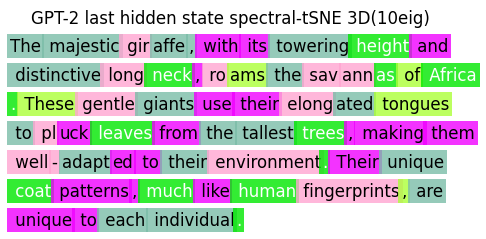
plt.title("GPT-2 last hidden state spectral-tSNE 3D(10eig)")
plt.tight_layout()
plt.show()
gpt2_text.png