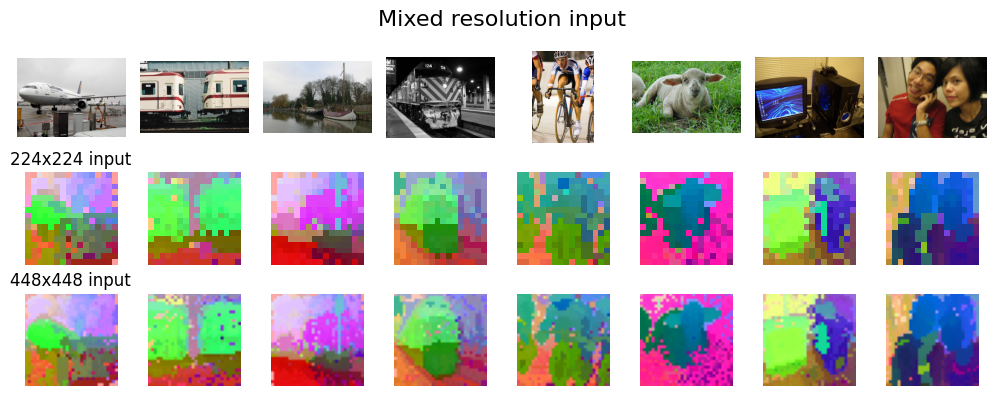
Mixing Resolutions
Handling Multi-Resolution Features
One of the strengths of Normalized Cuts (NCUT) is its flexibility in handling graph nodes from diverse sources. This includes mixing features from images of different resolutions. The process is straightforward: simply flatten the feature maps from all resolutions and concatenate them into a single node list. The graph construction and spectral clustering then proceed seamlessly on this unified set of nodes.
Feature Extraction from Multiple Resolutions
Below is an example of how to extract and mix features from two different resolutions using a pre-trained model (e.g., DINOv2).
Click to expand full code
import torchvision
import torch
from torchvision import transforms
from PIL import Image
import numpy as np
from einops import rearrange
from torch import nn

# Load Dataset
dataset_voc = torchvision.datasets.VOCSegmentation(
    "/data/pascal_voc/",
    year="2012",
    download=True,
    image_set="val",
)
print("Number of images in the dataset:", len(dataset_voc))

def feature_extractor(images, resolution=(448, 448), layer=11):
    if isinstance(images, list):
        assert isinstance(images[0], Image.Image), "Input must be a list of PIL images."
    else:
        assert isinstance(images, Image.Image), "Input must be a PIL image."
        images = [images]

    transform = transforms.Compose(
        [
            transforms.Resize(resolution),
            transforms.ToTensor(),
            transforms.Normalize([0.485, 0.456, 0.406], [0.229, 0.224, 0.225]),
        ]
    )

    # Extract DINOv2 last layer features
    class DiNOv2Feature(torch.nn.Module):
        def __init__(self, ver="dinov2_vitb14_reg", layer=11):
            super().__init__()
            self.dinov2 = torch.hub.load("facebookresearch/dinov2", ver)
            self.dinov2.requires_grad_(False)
            self.dinov2.eval()
            self.dinov2 = self.dinov2.cuda()
            self.layer = layer

        def forward(self, x):
            out = self.dinov2.get_intermediate_layers(x, reshape=True, n=np.arange(12))[
                self.layer
            ]
            return out

    feat_extractor = DiNOv2Feature(layer=layer)

    feats = []
    for i, image in enumerate(images):
        torch_image = transform(image)
        feat = feat_extractor(torch_image.unsqueeze(0).cuda()).cpu()
        feat = feat.squeeze(0).permute(1, 2, 0)
        feats.append(feat)
    feats = torch.stack(feats).squeeze(0)
    return feats
images = [dataset_voc[i][0] for i in range(20)]

# Extract features at 224x224
feats1 = feature_extractor(images, resolution=(224, 224), layer=9)
num_nodes1 = np.prod(feats1.shape[:3])

# Extract features at 448x448
feats2 = feature_extractor(images, resolution=(448, 448), layer=9)
num_nodes2 = np.prod(feats2.shape[:3])

# Mix features by flattening and concatenating
mixed_feats = torch.cat(
    [feats1.reshape(-1, feats1.shape[-1]), feats2.reshape(-1, feats2.shape[-1])], dim=0
)

print("Mixed feature shape:", mixed_feats.shape)
print("224x224 feature shape:", feats1.shape, 'num_nodes:', num_nodes1)
print("448x448 feature shape:", feats2.shape, 'num_nodes:', num_nodes2)

# Sample Output:
# Mixed feature shape: torch.Size([25600, 768])
# 224x224 feature shape: torch.Size([20, 16, 16, 768]) num_nodes: 5120
# 448x448 feature shape: torch.Size([20, 32, 32, 768]) num_nodes: 20480
Compute NCUT and t-SNE Coloring
We now apply NCUT to the mixed features.
from ncut_pytorch import Ncut
from ncut_pytorch.color import tsne_color

# Compute eigenvectors using Ncut
ncut = Ncut(
    n_eig=50,
    n_sample=30000,
    n_neighbors=10,
    device="cuda:0",
)
eigenvectors = ncut.fit_transform(mixed_feats)

# Generate RGB colors for visualization using t-SNE on eigenvectors
rgb = tsne_color(eigenvectors, num_sample=30000, knn=10, device="cuda:0")
Plotting the Results
Finally, we reshape the RGB colors back to their respective spatial dimensions for visualization.
import matplotlib.pyplot as plt

# Reshape RGB back to spatial dimensions
rgb1 = rgb[:num_nodes1].reshape(*feats1.shape[:3], 3)
rgb2 = rgb[num_nodes1:].reshape(*feats2.shape[:3], 3)

fig, axs = plt.subplots(3, 8, figsize=(10, 4))
for ax in axs.flatten():
    ax.axis("off")

for i in range(8):
    axs[0, i].imshow(images[i])
    axs[1, i].imshow(rgb1[i].cpu().numpy())
    axs[2, i].imshow(rgb2[i].cpu().numpy())

axs[1, 0].set_title("224x224 Input")
axs[2, 0].set_title("448x448 Input")
plt.suptitle("Mixed Resolution Input", fontsize=16)
plt.tight_layout()
plt.show()